Machine Learning - Bootstrap Aggregation (Bagging)
Bagging
Methods such as Decision Trees can be prone to overfitting on the training set which can lead to wrong predictions on new data.
Bootstrap Aggregation (bagging) is an ensembling method that attempts to resolve overfitting for classification or regression problems. Bagging aims to improve the accuracy and performance of machine learning algorithms. It does this by taking random subsets of an original dataset, with replacement, and fits either a classifier (for classification) or regressor (for regression) to each subset. The predictions for each subset are then aggregated through majority vote for classification or averaging for regression, increasing prediction accuracy.
Evaluating a Base Classifier
To see how bagging can improve model performance, we must start by evaluating how the base classifier performs on the dataset. If you do not know what decision trees are review the lesson on decision trees before moving forward, as bagging is a continuation of the concept.
We will be looking to identify different classes of wines found in Sklearn's wine dataset.
Let's start by importing the necessary modules.
from sklearn import datasets
from sklearn.model_selection import train_test_split
from sklearn.metrics import accuracy_score
from sklearn.tree import DecisionTreeClassifier
Next we need to load in the data and store it into X (input features) and y (target). The parameter as_frame is set equal to True so we do not lose the feature names when loading the data.
data = datasets.load_wine(as_frame = True)

X = data.data
y = data.target
In order to properly evaluate our model on unseen data, we need to split X and y into train and test sets.
X_train, X_test, y_train, y_test = train_test_split(X, y, test_size = 0.25, random_state = 22)With our data prepared, we can now instantiate a base classifier and fit it to the training data.
dtree = DecisionTreeClassifier(random_state = 22)
dtree.fit(X_train, y_train)
We can now predict the class of wine the unseen test set and evaluate the model performance.
y_pred = dtree.predict(X_test)

print("Train data accuracy:", accuracy_score(y_true = y_train, y_pred = dtree.predict(X_train)))
print("Test data accuracy:", accuracy_score(y_true = y_test, y_pred = y_pred))
Result:
Train data accuracy: 1.0
Test data accuracy: 0.8222222222222222
Creating a Bagging Classifier
For bagging we need to set the parameter n_estimators, this is the number of base classifiers that our model is going to aggregate together.
Note: The default parameter for the base classifier in BaggingClassifier is the DecisionTreeClassifier therefore we do not need to set it when instantiating the bagging model.
from sklearn.ensemble import BaggingClassifier

estimator_range = [2,4,6,8,10,12,14,16]

models = []
scores = []

for n_estimators in estimator_range:
    # Create bagging classifier
    clf = BaggingClassifier(n_estimators = n_estimators, random_state = 22)

    # Fit the model
    clf.fit(X_train, y_train)

    # Append the model and score to their respective list
    models.append(clf)
    scores.append(accuracy_score(y_true = y_test, y_pred = clf.predict(X_test)))
With the models and scores stored, we can now visualize the improvement in model performance.
import matplotlib.pyplot as plt

# Generate the plot of scores against number of estimators
plt.figure(figsize=(9,6))
plt.plot(estimator_range, scores)

# Adjust labels and font (to make visable)
plt.xlabel("n_estimators", fontsize = 18)
plt.ylabel("score", fontsize = 18)
plt.tick_params(labelsize = 16)

# Visualize plot
plt.show()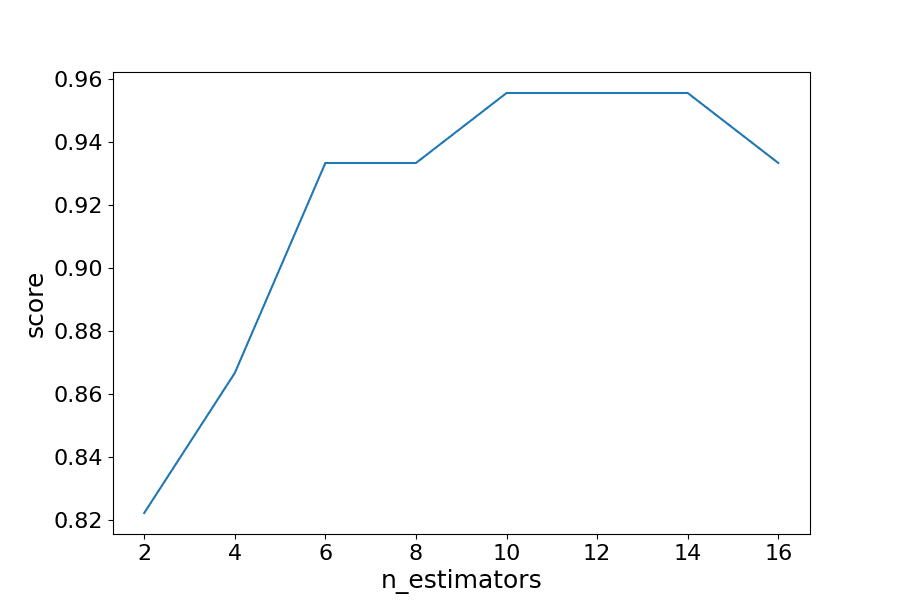
Example
Import the necessary data and evaluate the BaggingClassifier performance.
import matplotlib.pyplot as plt
from sklearn import datasets
from sklearn.model_selection import train_test_split
from sklearn.metrics import accuracy_score
from sklearn.ensemble import BaggingClassifier

data = datasets.load_wine(as_frame = True)

X = data.data
y = data.target

X_train, X_test, y_train, y_test = train_test_split(X, y, test_size = 0.25, random_state = 22)

estimator_range = [2,4,6,8,10,12,14,16]

models = []
scores = []

for n_estimators in estimator_range:

    # Create bagging classifier
    clf = BaggingClassifier(n_estimators = n_estimators, random_state = 22)

    # Fit the model
    clf.fit(X_train, y_train)

    # Append the model and score to their respective list
    models.append(clf)
    scores.append(accuracy_score(y_true = y_test, y_pred = clf.predict(X_test)))

# Generate the plot of scores against number of estimators
plt.figure(figsize=(9,6))
plt.plot(estimator_range, scores)

# Adjust labels and font (to make visable)
plt.xlabel("n_estimators", fontsize = 18)
plt.ylabel("score", fontsize = 18)
plt.tick_params(labelsize = 16)

# Visualize plot
plt.show()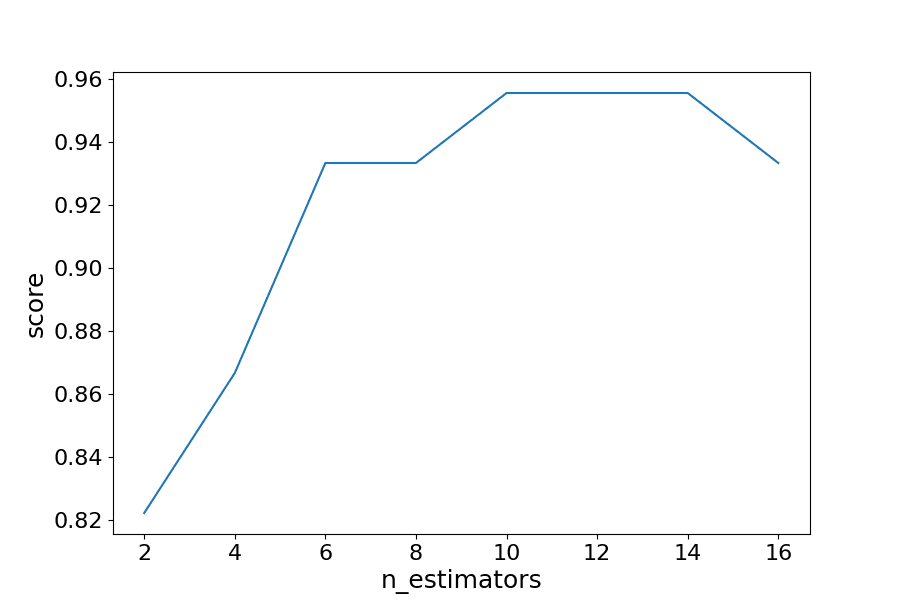
Results Explained
By iterating through different values for the number of estimators we can see an increase in model performance from 82.2% to 95.5%. After 14 estimators the accuracy begins to drop, again if you set a different random_state the values you see will vary.
In this case, we see a 13.3% increase in accuracy when it comes to identifying the type of wine.
Another Form of Evaluation
As bootstrapping chooses random subsets of observations to create classifiers, there are observations that are left out in the selection process. These "out-of-bag" observations can then be used to evaluate the model, similarly to that of a test set.
We saw in the last exercise that 12 estimators yielded the highest accuracy, so we will use that to create our model. This time setting the parameter oob_score to true to evaluate the model with out-of-bag score
Example
Create a model with out-of-bag metric
from sklearn import datasets
from sklearn.model_selection import train_test_split
from sklearn.ensemble import BaggingClassifier

data = datasets.load_wine(as_frame = True)

X = data.data
y = data.target

X_train, X_test, y_train, y_test = train_test_split(X, y, test_size = 0.25, random_state = 22)

oob_model = BaggingClassifier(n_estimators = 12, oob_score = True,random_state = 22)

oob_model.fit(X_train, y_train)

print(oob_model.oob_score_)
Since the samples used in OOB and the test set are different, and the dataset is relatively small, there is a difference in the accuracy. It is rare that they would be exactly the same, again OOB should be used quick means for estimating error, but is not the only evaluation metric.
Generating Decision Trees from Bagging Classifier
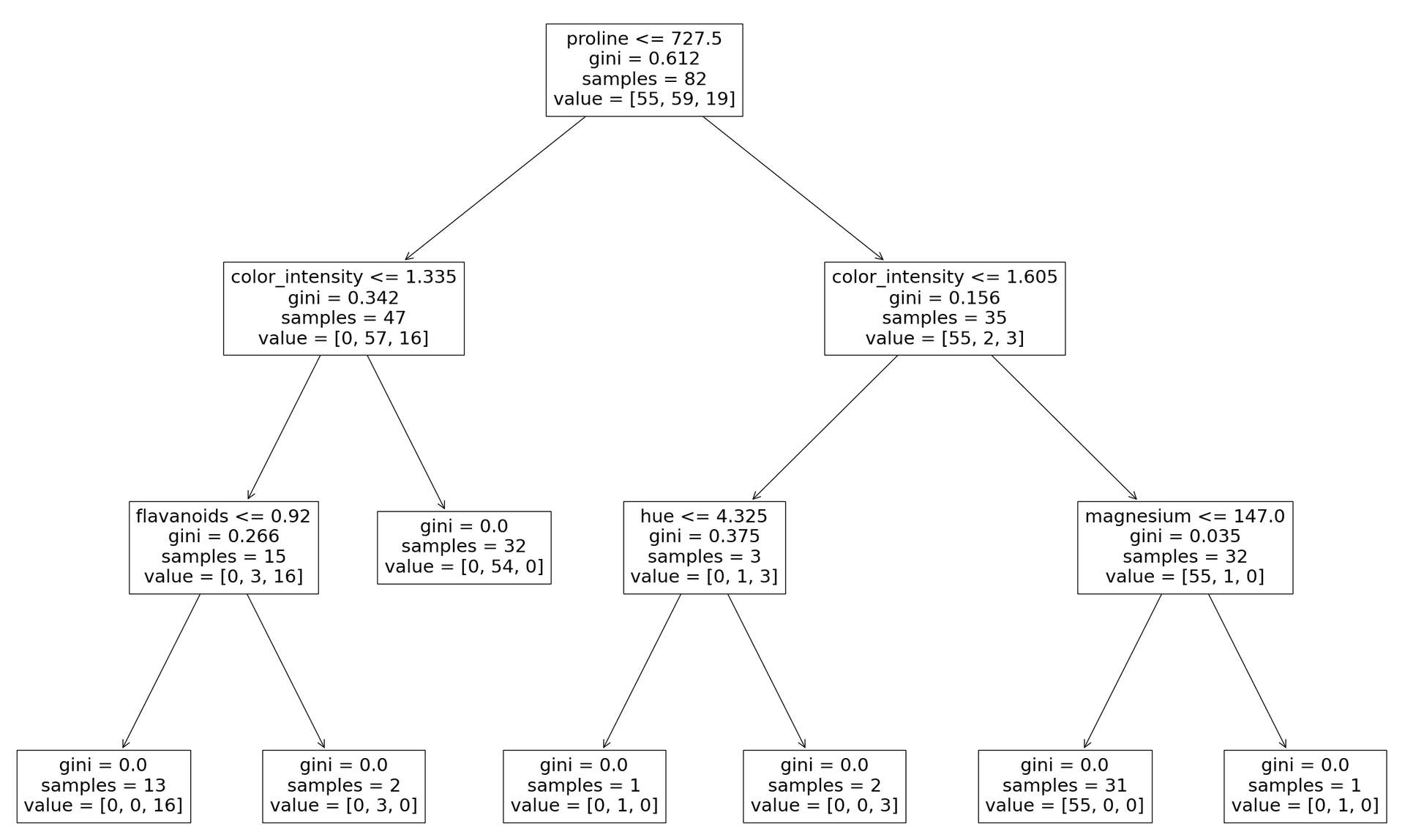
It is possible to see the individual decision trees that went into the aggregated classifier. This helps us to gain a more intuitive understanding on how the bagging model arrives at its predictions.
Note: This is only functional with smaller datasets, where the trees are relatively shallow and narrow making them easy to visualize.
We will need to import plot_tree function from sklearn.tree. The different trees can be graphed by changing the estimator you wish to visualize.
from sklearn.tree import plot_tree
import matplotlib.pyplot as plt

clf = BaggingClassifier(n_estimators = 12, oob_score = True, random_state = 22)
clf.fit(X_train, y_train)

plt.figure(figsize=(30, 20))
plot_tree(clf.estimators_[0], feature_names = X.columns)